VST34.9
Host Applications
MPC Beats
MPC Beats by AKAI is the ultimate beat-making freeware. It makes music production accessible for beginners and adds firepower for seasoned creators.
FreeView details
Home / Plugins / Host Applications / Audacity
by Unknown
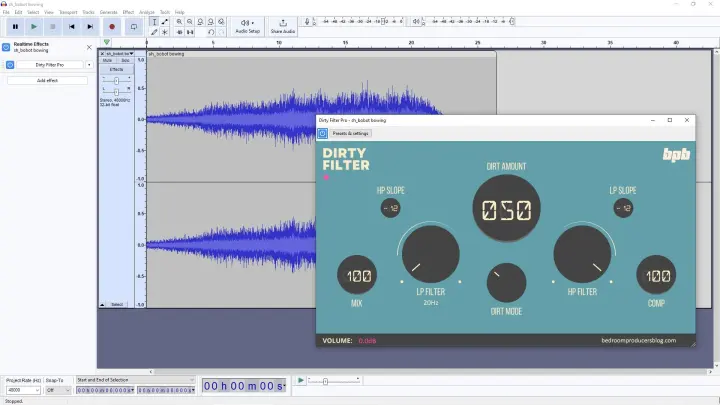
” It runs on Windows, macOS, and Linux, costs nothing, and has been actively developed since the early 2000s. You hit the red record button, audio gets captured from your selected input, and the waveform appears on screen. From there, you can trim, split, fade, normalize, apply effects, and export to almost any format. It handles multi-track recording when you need it, but works equally well as a single-track tool. I’ve been using Audacity for as long as I’ve been making music, and I still keep it installed even when I have a full DAW open.
It’s the fastest way to record a quick voice memo, edit a sample, batch-convert files, or capture a guitar idea before it disappears. The interface looks dated, and the workflow can feel clunky compared to a modern DAW, but the trade-off is stability and simplicity. x supports VST3, LADSPA, and Nyquist plugins, includes a useful noise reduction tool, and, in recent versions, adds a set of OpenVINO-based AI features (transcription, music separation, noise removal).
A quick note on the spyware rumors from a few years back. Those concerns related to telemetry settings were quickly walked back after community pushback. The current version is clean, open-source, and shipped through the official site or via MuseHub.
Links to www.audacityteam.org — the article includes the official download links.
Host Applications
MPC Beats by AKAI is the ultimate beat-making freeware. It makes music production accessible for beginners and adds firepower for seasoned creators.
Host Applications
Waveform Free is a feature-rich free digital audio workstation based on Tracktion Software’s flagship Waveform. The DAW offers a beat-making workflow suitable for both beginners and experienced…
Host Applications
LMMS is a free, open-source platform for beat creation. It replicates the efficient workflow of FL Studio, one of the most popular beat-maker tools.
Host Applications
OS: Web (browser) + iOS + Android Free access: Free account required Tracks: Unlimited projects, practical performance depends on the browser/system Plugin formats: Built‑in effects only (no VST/AU…
Host Applications
OS: Windows only Free access: Free tier with BandLab account Tracks: Unlimited audio + MIDI tracks Plugin formats: VST2/VST3 Offline use: Yes (after activation) Pros: Full desktop workflow, advanced…

Host Applications
OS: Windows + macOS Free access: Bundled with hardware/software Tracks: 8 total tracks Plugin formats: VST2/VST3/AU Offline use: Yes Pros: Same workflow as full Ableton Live, excellent for loops and…