VST34.9
Host Applications
MPC Beats
MPC Beats by AKAI is the ultimate beat-making freeware. It makes music production accessible for beginners and adds firepower for seasoned creators.
FreeView details
Home / Plugins / Host Applications / Serato Studio
by Unknown
OS: Windows + macOS Free access: Free mode available Tracks: Limited scenes/features in free mode Plugin formats: VST/AU Offline use: Available after online activation Pros: Fast beatmaking workflow, sample‑focused design, DJ‑friendly interface Cons: Feature limits in free mode, not ideal for traditional recording, less suited for complex mixing Serato Studio is designed primarily for beatmakers and DJs who want a sample‑driven workflow.
The interface lets you have fun with chopping, arranging, and triggering loops rather than detailed multitrack recording. This makes it quick to sketch drum patterns and build tracks from samples. To me, Serato Studio feels closer to a groovebox or DJ tool than a traditional DAW. That being said, it’s the perfect entry into the world of digital audio workstations if you’re coming from a DJ background. The free mode lets you use the core workflow and create complete beats without paying.
For users coming from DJ software, Serato Studio will feel familiar and probably the easiest to pick up. Its main limitation is that it’s less suited to complex recording or mixing tasks compared to full‑featured DAWs.
Links to bedroomproducersblog.com — the article includes the official download links.
Host Applications
MPC Beats by AKAI is the ultimate beat-making freeware. It makes music production accessible for beginners and adds firepower for seasoned creators.
Host Applications
OS: Web (browser) + iOS + Android Free access: Free account required Tracks: Unlimited projects, practical performance depends on the browser/system Plugin formats: Built‑in effects only (no VST/AU…

Host Applications
OS: Windows + macOS Free access: Bundled with hardware/software Tracks: 8 total tracks Plugin formats: VST2/VST3/AU Offline use: Yes Pros: Same workflow as full Ableton Live, excellent for loops and…
Host Applications
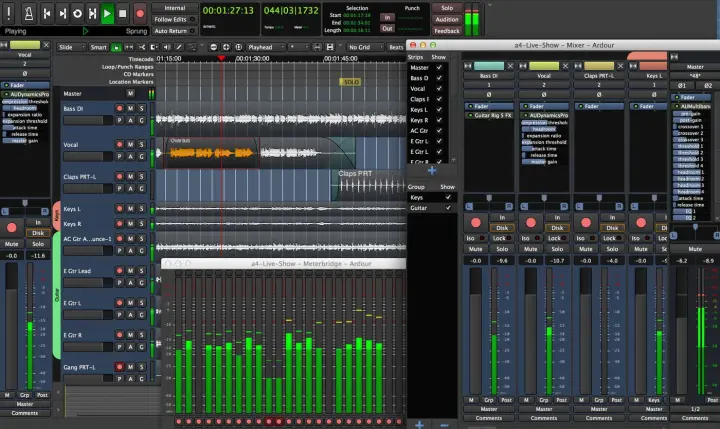
Ardour is a professional-grade open-source DAW that ships in a different way than anything else on this list, and the licensing situation is worth understanding before you download. On Linux, Ardour…
Host Applications
Waveform Free is a feature-rich free digital audio workstation based on Tracktion Software’s flagship Waveform. The DAW offers a beat-making workflow suitable for both beginners and experienced…
Host Applications
LMMS is a free, open-source platform for beat creation. It replicates the efficient workflow of FL Studio, one of the most popular beat-maker tools.